How to Connect Your Deriv Account to Tradely
Tradely trades through your own Deriv account. You can connect with a secure Deriv login or with an API token. Here is how each one works.
Last updated:
Before you start
You need a Deriv account. If you do not have one yet, the login window has a free sign-up link ("No account yet? Create one free"). Your funds stay with Deriv, and Tradely places trades on your behalf through your account.
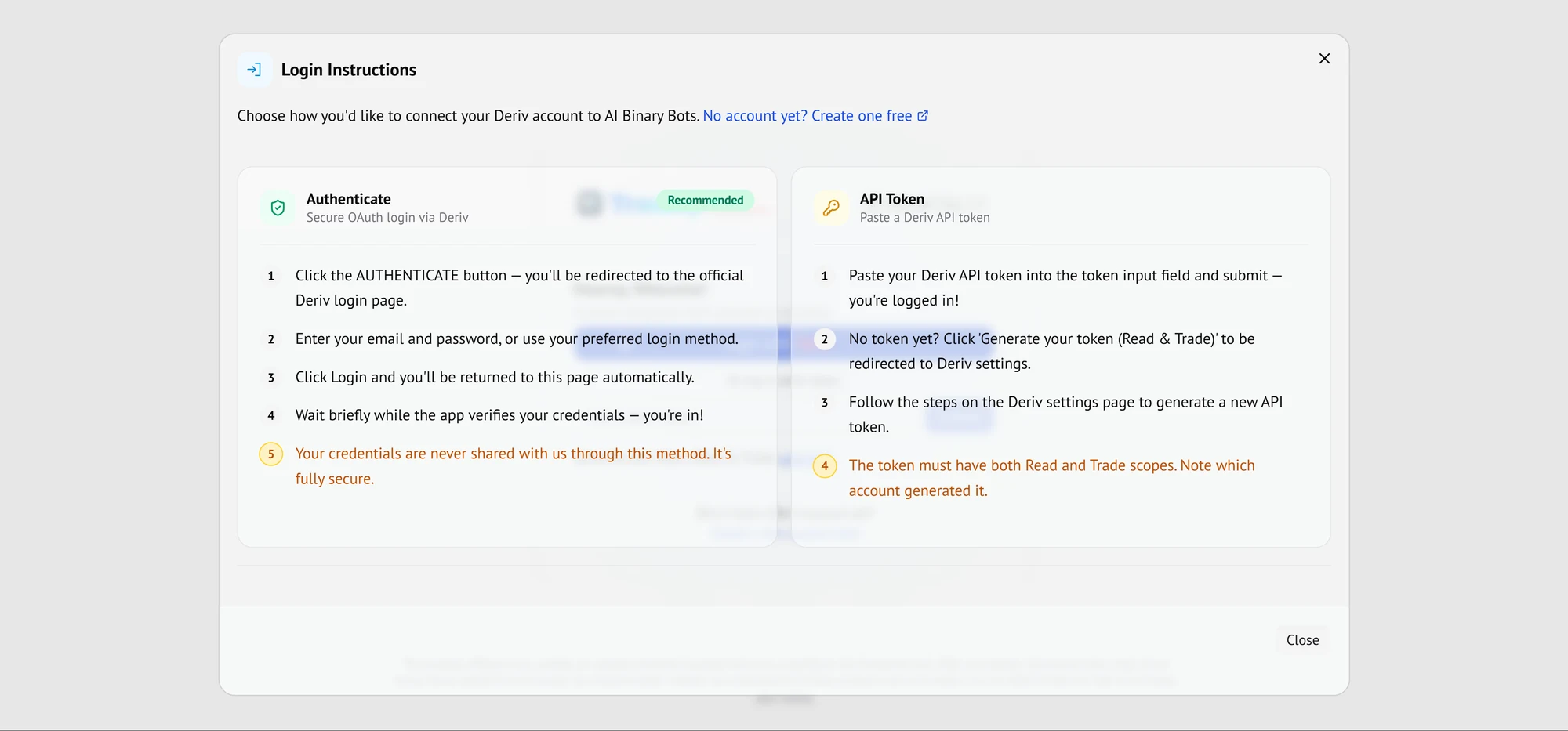
Method 1: Authenticate with Deriv (recommended)
This is the method the app recommends. It uses Deriv's own secure OAuth login, so you sign in on Deriv's page, not ours.
- Click the Authenticate button. You are redirected to the official Deriv login page.
- Enter your email and password, or use your preferred login method.
- Click Login. You are returned to Tradely automatically.
- Wait briefly while the app verifies your credentials. You are in.
Your credentials stay with Deriv
With this method, the app states that your credentials are never shared with us.
Method 2: Connect with an API token
If you prefer, you can paste a Deriv API token instead. A token is a code issued by Deriv that allows specific actions on your account, so it needs to be created with the right permissions.
- Paste your Deriv API token into the token field and submit. You are logged in.
- No token yet? Click Generate your token (Read & Trade). You are redirected to Deriv settings.
- Follow the steps on the Deriv settings page to generate a new API token.
- Make sure the token has both Read and Trade scopes, and note which account generated it.
Treat an API token like a password. Give it only the scopes the app asks for (Read and Trade), keep it private, and delete it in your Deriv settings if you no longer need it.
Which method should I choose?
| Feature | Authenticate (OAuth) | API token |
|---|---|---|
| Recommended | Yes | Alternative |
| What you do | Sign in on Deriv's login page | Paste a token you generated in Deriv settings |
| Credentials shared with Tradely | Never, according to the app | A token is shared, not your password |
| Needs setup first | No | Yes: generate a token with Read and Trade scopes |
Authenticate with Deriv compared with an API token.
Once you are connected, switch to a demo account before you run anything. See how to practise on a demo account and switch to a real account.
Practise on a Deriv demo account before you use real money.
Get StartedFrequently asked questions
- Does Tradely see my Deriv password?
- Not with the Authenticate method. You sign in on Deriv's own login page, and the app states that your credentials are never shared with it.
- Which scopes does the API token need?
- Both Read and Trade. The login window also asks you to note which account generated the token.
- Do I need a Deriv account first?
- Yes. The login window includes a link to create a free Deriv account if you do not have one.
Keep reading
- Demo and real accountsA demo account lets you run assistants with virtual funds. When you are ready, you switch to your real account from the same menu.
- Run your first assistantEverything you need to start an assistant sits in one panel: market, contract, stake, risk limits and strategy. This walkthrough follows the panel from top to bottom.
- Do I need to code?No. Tradely offers ready-made assistants that you set up with dropdowns and a play button. There is nothing to write or paste.
Sources
Risk warning: Trading binary options involves a high level of risk and you could lose your entire stake. Only trade with money you can afford to lose. This page is educational and is not financial advice.